A DITO SIM may be registered correctly but still show no data, weak signal, failed calls, or delayed activation on a Huawei phone. Most problems can be isolated without resetting the device. Start with registration status and compatibility, then check VoLTE, mobile data, and the network profile in a clear order.
Confirm Registration and Network Selection
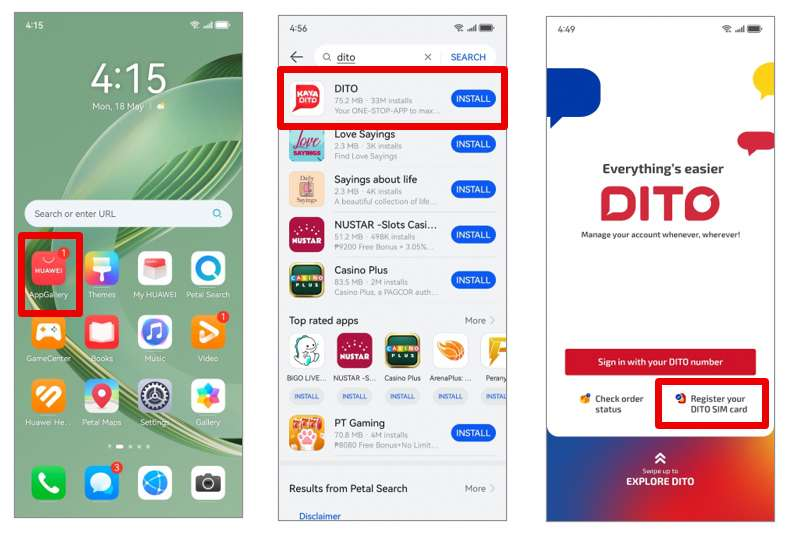
DITO states that a new SIM activates after successful registration. Open the DITO App or the official registration page and confirm that the submission was completed. If registration is still pending, avoid repeatedly changing network settings because the SIM may not yet be authorised for service.
The Huawei Community page for how to activate dito sim in huawei provides the basic activation route for Huawei users. After confirmation, restart the phone and open Settings > Mobile network > SIM management. Make sure the DITO SIM is enabled and selected for mobile data.
Check Compatibility and VoLTE
DITO uses VoLTE for voice services, so enable it when the option is available. In Huawei settings, open Mobile network, choose the DITO SIM, and look for VoLTE calls or a similar switch. Menu names can differ by EMUI version and phone model.
If mobile data works but calls do not, VoLTE or device compatibility is the first area to check. DITO maintains a compatibility list, but even listed phones may require current system software or network settings.
Review the APN When Data Does Not Work
If the phone has signal but cannot access the internet, inspect the Access Point Name. Go to Settings > Mobile network > Mobile data > Access Point Names. DITO’s official APN guidance uses internet.dito.ph. Save the profile, select it, and restart mobile data.
Do not change unrelated APN fields unless official support instructs you to do so. A typo in the APN name is enough to stop data access.
Use a Simple Troubleshooting Order
For users searching how to activate dito sim in huawei after the first attempt fails, the safest order is: confirm registration, restart the phone, select DITO for data, enable VoLTE, verify the APN, and test in an area with DITO coverage. Update EMUI and the DITO App before reinstalling anything.
If the SIM remains inactive, contact DITO Customer Care through the official app or support channels. Keep the SIM number and registration confirmation ready, but do not share ID images through unverified messages.
Return to the Official Setup Reference
Use the how to activate dito sim in huawei page as the Huawei-specific baseline. Once the installation and registration path is correct, troubleshoot one setting at a time. This makes it easier to identify whether the problem comes from activation, device compatibility, VoLTE, coverage, or the data profile.